ZillaMessenger chat room www.chatzilla.org
×
Help & settings
Click on the buttons to toggle content display.
|
To adjust password or profanity filter:
|
|
A profile chat room contains the default Lobby channel, and the + button to add more channels. Channels can be muted (locked) or unmuted (unlocked) live by selecting the dotted drop down menu beside the channel name as the chat room moderator.
100 maximum channels allowed.
|
|
Put your own picture behind you while you broadcast your webcam. Everyone watching sees you in front of the picture.
Add a background
1. Go to the chat room and start your webcam broadcast. 2. Click the effects button ✨ under your webcam. 3. Click Uploads. 4. In the Use as drop down, select Background (picture). 5. Click Choose File and pick your picture (PNG, JPG, WebP or GIF, up to 5 MB). 6. Click Upload. After a few seconds it shows under My effects and is switched on. Click it there to use it again later. Remove the background
1. Click the effects button ✨ under your webcam. 2. Click Backgrounds. 3. Click the red X. To delete the uploaded picture for good, click Uploads and the 🗑 under the picture. Example
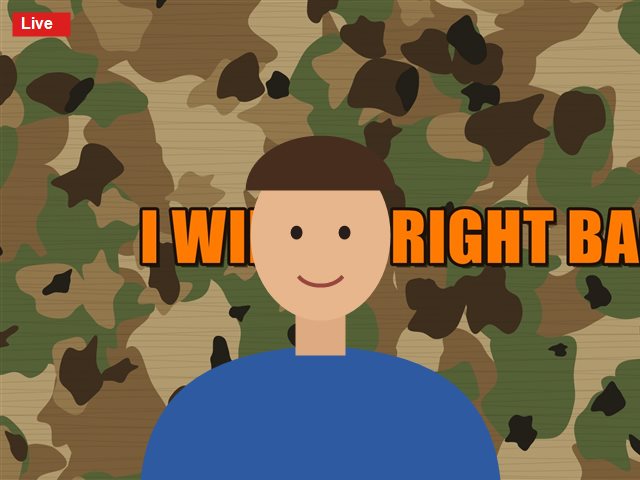
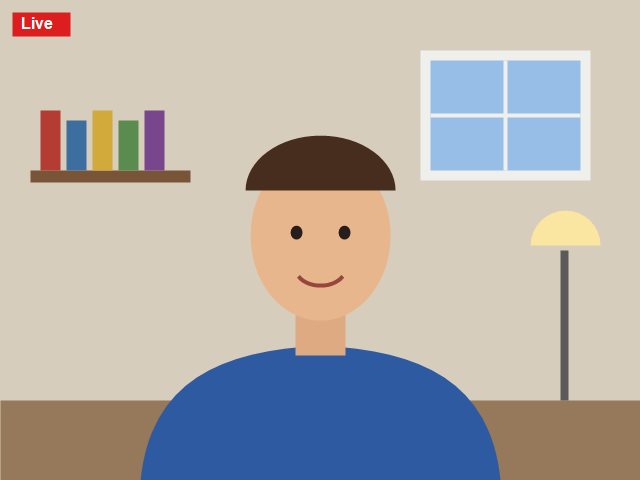 Before: no background Tips: you stand in front of the middle of the picture, so keep words away from the centre. Webcams are narrower than wide pictures, so the sides may be cut off a little. Words on the picture read the right way round for you and for everyone watching.
Away from webcam (AFW) video
Step away from the camera and your viewers see a video instead of an empty room. When nobody is in front of the camera for the time you choose, it plays over and over until you (or anyone) are back in front of the camera. 1. Click the effects button ✨ under your webcam, then Uploads. 2. In the Use as drop down, select Away from webcam (AFW) video. 3. Click Choose File, pick an MP4, WebM or MOV video (up to 25 MB) and click Upload. 4. Under Away from webcam (AFW) video, pick the video to use (or None) and choose Start after: 5, 10, 15, 30 or 60 seconds, or 5, 10, 15, 30 or 60 minutes. The 🗑 deletes a video. You can upload 1 video of your own: only the first 60 seconds are kept, without sound, and it counts toward your upload space. Webcams store
Ready-made backgrounds (BE RIGHT BACK, BRB, WE'LL BE BACK, I'LL BE BACK on camo, space or clouds) and away from webcam videos that loop without a jump: open your profile settings (the gear) and scroll to WEBCAMS STORE. Bought backgrounds show up in ✨ → Backgrounds, bought videos in ✨ → Uploads → Away from webcam (AFW) video. They count toward your upload space and can't be shared. |
|
Please enjoy auto-embedded video streaming functionality in chat, posts (not video or picture) & messaging from popular media platforms on demand by following these simple URL formats when typing:
https://www.youtube.com/watch?v=yourvideoID
|
|
Supported video, picture and file upload types:
.webm .jpg .gif .png .jpeg .mp3 .wav .m4a .ogg .ac3 .aac .mid .midi .wma .flac .mp4 .mpg .mpe .mpeg .avi .wmv .3gp .mov .zip .zipx .rar .7z .arc .b1 .pea .tar.gz .pdf .doc .xls .psd .ppt .rtf .svg .ttf
|
|
Commands typed in chat to moderate (the @ is optional for usernames).
/kick @username
/k @username
/ban @username
/b @username
/unban @username
/u @username
|
|
# is a hashtag typed infront of a word to make the word authoritative auto-linking it across the website to similar posts.
#freespeech |
When ChatZilla.org deletes an account, why, and how to keep yours. To keep the site fast and free for everyone, accounts nobody uses are deleted. Accounts not used for 1 year
Groups (sub accounts)
When the owner is deleted, the groups are freed
Delete my account
Banned accounts
Other accounts
What is deleted and what is kept
Questions? Please use the contact form. We answer within 24 hours. |
ChatZilla is helping millions to connect, chat and share social media with people in a self-moderated online community. Please help to crowd fund the next step of ChatZilla's evolution - any amount is really appreciated! Log in or make a free account to donate. One payment, nothing repeats. Every donation gives a supporter badge on your About page for 12 months: $5.00 and $10.00 🥉 Bronze, $25.00 🥈 Silver, $50.00 and $100.00 🥇 Gold. It is a support payment to ChatZilla.org, not a charity donation, so there is no tax receipt. Cards are handled by Stripe: ChatZilla.org never sees or keeps your card number. |
   |   
|
 Messaging
 Privacy
 News Feed
 Help & settings
 Register
 Logout


1 ONLINE
INFO:

@ZillaMessenger WEBCAM:
CHANNELS:
LLobby
what is so funny 😍😘 þ39-þ
what is so funny 😍😘 þ39-þ
A
gjhgjhgjh
0
☢ þ97-þAndroid app pics and videosgjhgjhgjh
ARCADE:
 Hairy Chomper
 Gassy Galaxy
 Bloat Blocks
 Tank Tumble
 Noodle Doodle
 Tooty Flyer
 Brick Bonker
 Tile Pile
 Mine Your Business
 Ping Pong Wrong
 Toad Rage
 Space Junk
 Bug Buster
 Fart Defense
 Banana Barrels
 TOP PLAYERS
ONLINE:

